 EasyAdminBlazor


Login Log
Overview
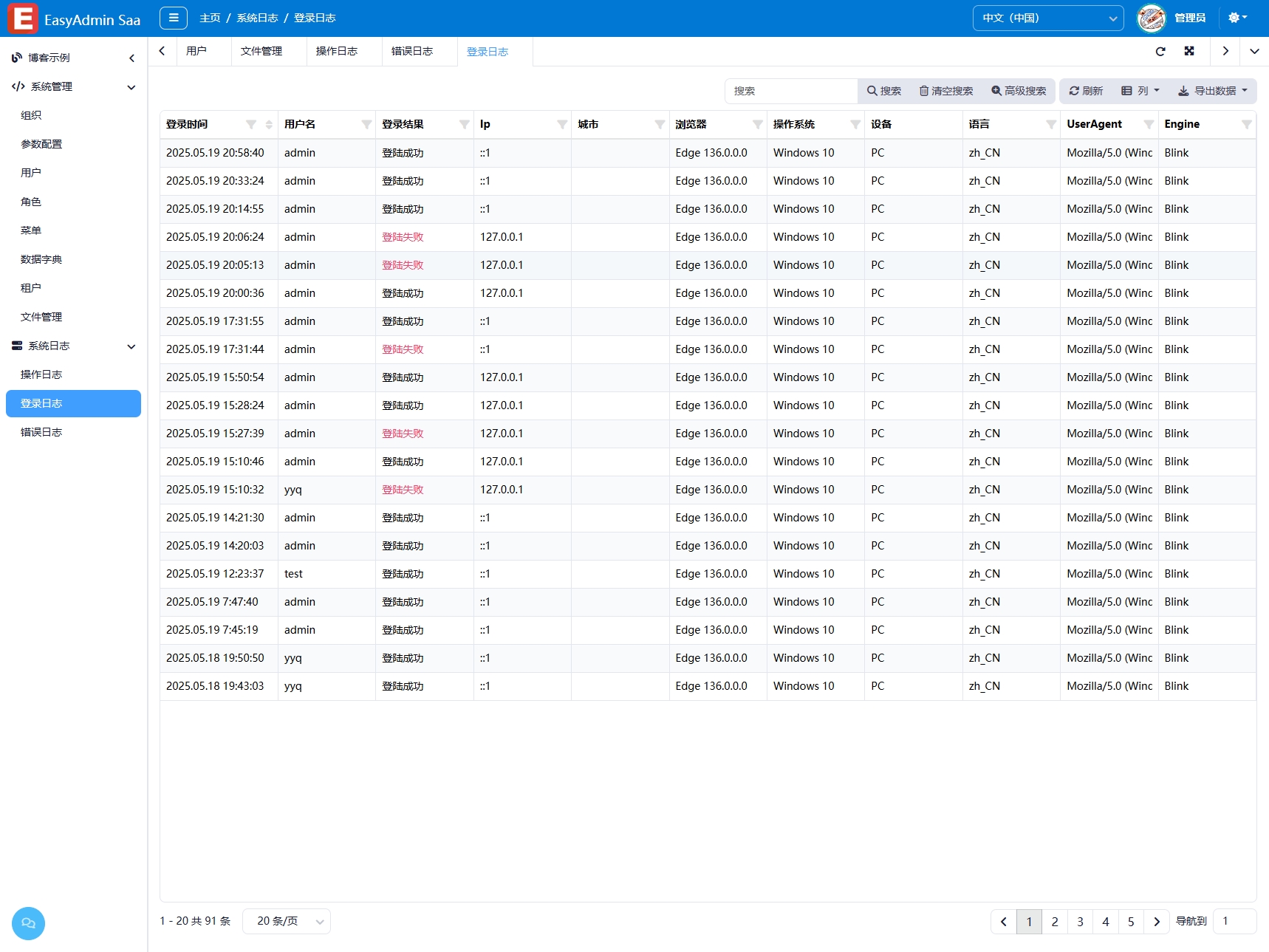
The Login Log module records all user login operations, including both successful and failed login attempts. Each log entry details the login username, IP address, geographic location, browser information, operating system, and other client environment information. This module is read-only and does not support add, edit, or delete operations, ensuring the integrity and immutability of the logs. By analyzing login logs, abnormal login behavior can be detected promptly, enhancing system security.
Usage
Accessing the Login Log Page
Navigate to "System Management" → "Login Log" in the system navigation bar.
Querying Logs
- Simple Search: Enter keywords such as username or IP in the search box for quick filtering.
- Advanced Search: Click "Advanced Search" to combine multiple criteria for precise querying.
Exporting Logs
Click the "Export" button to export the current filtered results as an Excel file.
Interface Description
List Columns
- Username: Account used for login
- Login Type: Login Success / Login Failure (failures are highlighted in red)
- IP Address: Source IP of the login
- City: IP geolocation
- Browser: Browser and version used
- Operating System: OS and version
- Device Type: PC / Mobile / Tablet, etc.
- Login Time: Time of the operation
Related Entity
SysLoginLog — Login log entity