 EasyAdminBlazor


CrudGenerator - Code Generator
💡 Pro Tip: Use AI to Generate Entity Classes
Before using the code generator, if you don't have an entity class yet, let AI write it for you:
I need a product table with Name, Price, Stock, and CategoryId (which links to a category table). CategoryId is a foreign key. Use FreeSql entity attributes. The entity class should inherit EntityFull. Add necessary attributes such as Table, Column, DisplayName, and Navigate.
AI will generate the complete entity class code — just copy and paste it into your project. For a detailed example, refer to the "Starting a New Module" document.
Overview
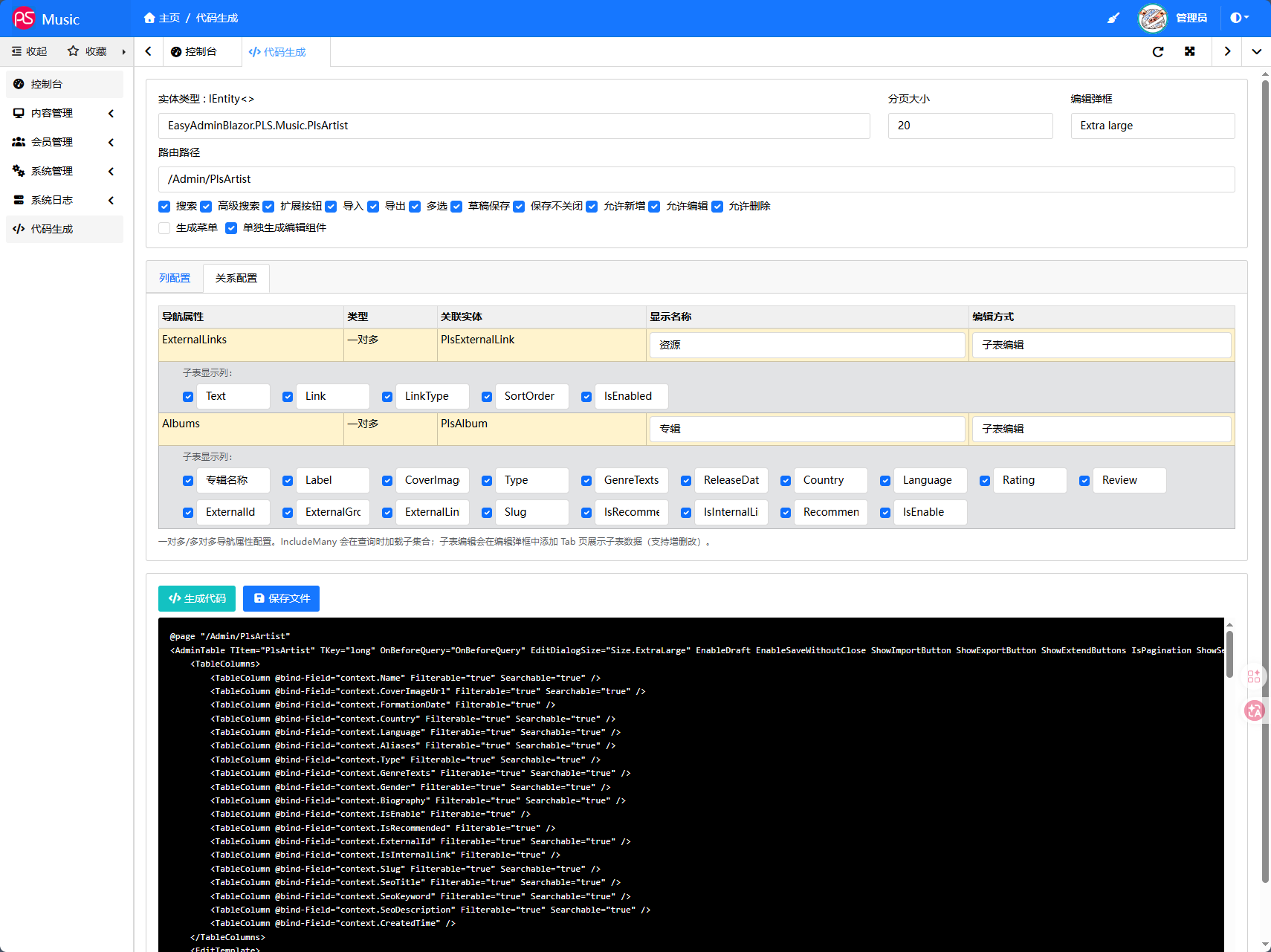
CrudGenerator is a visual code generation page that automatically produces CRUD page code based on the AdminTable component by selecting an entity type and configuring columns, relationships, and other options, reducing repetitive coding work.
Access URL: /Admin/CrudGenerator
Features
- Automatically scans
IEntity<>entities in the project – select and use - Visual column configuration (display, filter, search, edit column width)
- Auto-detects ManyToOne navigation properties (foreign key → related entity), supports dropdown/dialog selection
- Auto-detects OneToMany / ManyToMany collection navigation properties, supports IncludeMany loading or sub-table editing
- Distinguishes
[Flags]enums (MultiSelect) from regular enums (Select) - Automatically uses Switch/NullSwitch for
bool/bool?types - Supports feature toggles like Draft Auto-Save (
EnableDraft), Save Without Close (EnableSaveWithoutClose) - Supports generating a separate edit template component file
- Supports menu generation with automatic add/edit/delete button creation
- Code preview – WYSIWYG
- Integrated AI assistant (OpenAI-compatible API) for natural language code customization
- Configuration auto-saves to browser localStorage and restores on next use
Configuration
Basic Settings
| Option | Description |
|---|---|
| Entity Type | Select the entity for CRUD generation. Auto-scans IEntity<> and [Table]-attributed classes |
| Page Size | Number of records per page |
| Edit Dialog | Size of the edit dialog (Large / ExtraLarge / Fullscreen, etc.) |
| Route Path | Page route, e.g. /Admin/MyEntity |
| Search | Show simple search box |
| Advanced Search | Show advanced search button |
| Extend Buttons | Show extension button area |
| Import | Show import button |
| Export | Show export button |
| Multi-Select | Enable table multi-select |
| Draft Save | Enable draft auto-save |
| Save Without Close | Keep dialog open after saving |
| Allow Add/Edit/Delete | Control CRUD button visibility |
| Generate Menu | Auto-create menu entry (with add/edit/delete buttons) on save |
| Separate Edit Component | Generate a standalone edit component file instead of inline template |
Column Configuration
| Option | Description |
|---|---|
| Property | Entity property name |
| Type | C# type of the property |
| Display Name | Text shown in the list and edit template |
| Display | Whether to show this column in the table list |
| Filter | Enable column header filtering |
| Search | Enable text search (string type only) |
| Edit Column Width | Field width in the edit dialog (Single/2-col/3-col/4-col) |
ManyToOne Configuration:
- Foreign key properties auto-detect the related entity
- Option to show the related entity name in the list
- Edit mode: Dropdown / Dialog Select
Relationship Configuration
| Option | Description |
|---|---|
| Navigation Property | Collection navigation property name (e.g., Albums, Menus) |
| Type | One-to-Many or Many-to-Many |
| Related Entity | The related entity type |
| Display Name | Tab title shown in the edit dialog |
| Edit Mode | Disabled / IncludeMany Load / Sub-Table Edit |
Sub-Table Edit: Adds a Tab in the edit dialog with an editable table for managing child collection data (add/remove rows). Column display text is customizable.
Generated Code
Inline Mode (Default)
All code is generated in a single Entity.razor file with an inline EditTemplate:
@page "/Admin/MyEntity"
<AdminTable TItem="MyEntity" TKey="long" ...>
    <TableColumns>
        ...
    </TableColumns>
    <EditTemplate>
        <!-- Inline edit template -->
    </EditTemplate>
</AdminTable>
@code { ... }
Separate Mode (Separate Edit Component checked)
Generates two files:
Entity.razor: Main page referencing the edit componentEntityEditTemplate.razor: Edit template component
@* Entity.razor *@
<AdminTable ...>
    ...
    <EditTemplate>
        <EntityEditTemplate Model="context" />
    </EditTemplate>
</AdminTable>

@* EntityEditTemplate.razor *@
@inject CommonLocalizer CommonLocalizer
...
@code {
    [Parameter]
    [NotNull]
    public MyEntity? Model { get; set; }
}
Sub-Table Generated Code
For collection navigation properties configured as "Sub-Table Edit":
<TabItem Text="ExternalLinks">
    <table class="table table-sm">
        <tr>
            <th><button @onclick="e => Model.ExternalLinks.Add(new())">+</button></th>
            <th>Text</th>
            <th>Link</th>
        </tr>
        @foreach (var item in Model.ExternalLinks)
        {
            <tr>
                <th><button @onclick="e => Model.ExternalLinks.Remove(item)">🗑</button></th>
                <td><input @bind="item.Text" /></td>
                <td><input @bind="item.Link" /></td>
            </tr>
        }
    </table>
</TabItem>
Type Mapping Rules
| Entity Property Type | Table Column | Edit Template Component |
|---|---|---|
string |
<TableColumn Filterable Searchable> |
<BootstrapInput> |
int / long / decimal |
<TableColumn Filterable> |
<BootstrapInput type="number"> |
bool |
<TableColumn Filterable> |
<Switch> |
bool? |
<TableColumn Filterable> |
<NullSwitch> |
DateTime |
<TableColumn Filterable> |
<DateTimePicker> |
[Flags] Enum |
<MultiSelect> column filter |
<MultiSelect> |
| Regular Enum | <TableColumn Filterable Searchable> |
<Select> |
| ManyToOne FK | Related entity name + filter | <AdminSelectEntity> |
| OneToMany/ManyToMany Collection | — | Sub-Table Edit / IncludeMany |
Configuration Persistence
When switching entities, all column configurations, relationship settings, and basic options are automatically saved to the browser's localStorage (key: CrudGen_{EntityFullName}). When you select the same entity again, all settings are restored automatically.
Save Location
Generated files are saved to the currently running project's Components/ directory, with subdirectories determined by the route path.